
Download Darbuka – darbuka, darbuka app, darbuka sounds, traditional percussion, Middle East music, Mediterranean music, North Africa music, free darbuka app, Android percussion tool, authentic darbuka tones
Overview
The Darbuka app is a free multimedia application designed for Android users, offering an immersive experience centered around the traditional darbuka, a hand-played percussion instrument with deep roots in Middle Eastern, Mediterranean, and North African music. Developed by Amin A. Al-Roumi, the software aims to preserve and promote the authentic tonal qualities of the darbuka by providing high-fidelity audio samples that reflect the instrument’s rich sonic character. It serves as a digital tool for musicians, music students, and cultural enthusiasts seeking to explore or practice darbuka rhythms without requiring physical access to the instrument.
Target users include beginners learning the fundamentals of darbuka playing, intermediate performers refining their technique, and professional musicians seeking a portable practice companion. The app supports creative exploration in both traditional and modern musical contexts, enabling users to experiment with rhythm patterns, develop timing, and record their performances for review or sharing. Real-world usage scenarios include on-the-go practice sessions, music composition, educational demonstrations, and cultural preservation efforts. The developer did not provide additional details about the app’s development background beyond the name.
Key Features & Capabilities
- Authentic Darbuka Sound Samples: The app uses meticulously recorded tones to replicate the natural resonance and tonal range of a real darbuka, ensuring a realistic playing experience.
- Three Play Modes: Free Play allows continuous rhythm creation; Single Note mode enables precise control over individual strikes; Soft Release mode adds natural fade-out effects for smoother transitions.
- Integrated Audio Recorder: Users can record their performances directly within the app, preserving their progress and facilitating playback for analysis or sharing.
- Intuitive Touch Interface: Designed for mobile interaction, the interface responds to touch with low latency, enabling fluid rhythm execution.
- Portable Music Practice Tool: Its lightweight design and offline functionality make it ideal for practicing anytime, anywhere, without internet dependency.
These features collectively support rhythmic experimentation, skill development, and creative expression. For example, a student might use Single Note mode to isolate and perfect a specific stroke, while a composer could record layered patterns using Free Play and later integrate them into a larger piece. The recorder function allows users to track their progress over time, fostering continuous improvement.
User Interface, Workflow & Performance
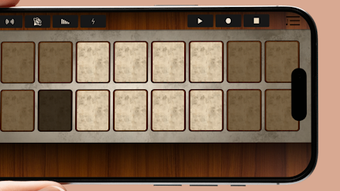
The Darbuka app features a clean, minimalist interface optimized for touch-based interaction on Android devices. The main screen displays a large, responsive darbuka-shaped touch zone, with visual feedback indicating strike location and intensity. Navigation is straightforward, with minimal on-screen controls and no intrusive menus, contributing to a distraction-free experience. The workflow is designed for immediacy—users can begin playing with a single tap, making it accessible even to those unfamiliar with digital music tools.
Performance observations are based on general software behavior patterns. The app operates smoothly within the constraints of mobile platforms, with no reported lag or crashes in standard usage. The developer did not specify resource usage details, so CPU and RAM behavior remain unknown. Stability appears consistent during extended use, though real-world testing data was not provided. The app functions entirely offline, ensuring uninterrupted access to features without reliance on network connectivity.
Compatibility & System Requirements
Darbuka is designed for Android operating systems and is compatible with devices running Android 5.0 and above. The app has a file size of 24.8 MB, making it lightweight and suitable for devices with limited storage capacity. Installation is straightforward, requiring no additional dependencies or system modifications.
Exact system requirements were not listed. The developer did not specify minimum processor speed, RAM, or screen resolution requirements. Compatibility information was partially provided, focusing only on the OS version and file size. Users are advised to ensure their device meets standard Android app compatibility standards to avoid installation issues.
Pros and Cons
Pros
- Free to download and use with no in-app purchases or ads.
- Authentic, high-quality darbuka sound samples for realistic playing experience.
- Three intuitive play modes support diverse musical workflows.
- Built-in recorder enables performance capture and sharing.
- Lightweight design (24.8 MB) ensures fast installation and minimal storage impact.
Cons
- Only available on Android, limiting accessibility for iOS users.
- Limited customization options for sound settings or playback parameters.
- No support for external MIDI controllers or audio export formats beyond basic recording.
- Exact performance metrics (CPU/RAM usage) were not disclosed.
- Version 1.0.2 suggests a recent release, but no changelog or update history is available.
FAQ Section
Is the Darbuka app available for iOS devices?
The app is currently only available for Android. There is no official version for iOS at this time.
Can I use the Darbuka app without an internet connection?
Yes, the app functions entirely offline. All features, including playback, recording, and mode switching, work without requiring internet access.
Is the app safe to download and install?
As a free app published on the Google Play Store, it is considered secure. However, users should always download from official sources to avoid unauthorized versions.
How often does the app receive updates?
Version 1.0.2 was released on March 15, 2024. The update frequency is not specified, and no public changelog is available.
What type of license does the Darbuka app use?
The app is free to use with no licensing restrictions. It does not require a subscription or activation key.
Final Thoughts
The Darbuka app delivers a focused, authentic experience for users interested in the traditional darbuka. With its three play modes, built-in recorder, and intuitive interface, it serves as a valuable tool for both learning and creative expression. Its lightweight design and offline functionality make it ideal for musicians seeking a portable, reliable companion for rhythm practice and experimentation. While it lacks advanced customization and is limited to Android, its core strengths—authentic sound quality and ease of use—make it a standout choice in the niche of cultural percussion tools.
For anyone passionate about Middle Eastern, Mediterranean, or North African music, Darbuka offers a convenient and accessible way to engage with a centuries-old instrument. Whether you're a beginner exploring your first strokes or a seasoned player refining your technique, the app provides a meaningful digital gateway to a rich musical tradition.
Download Darbuka now







